
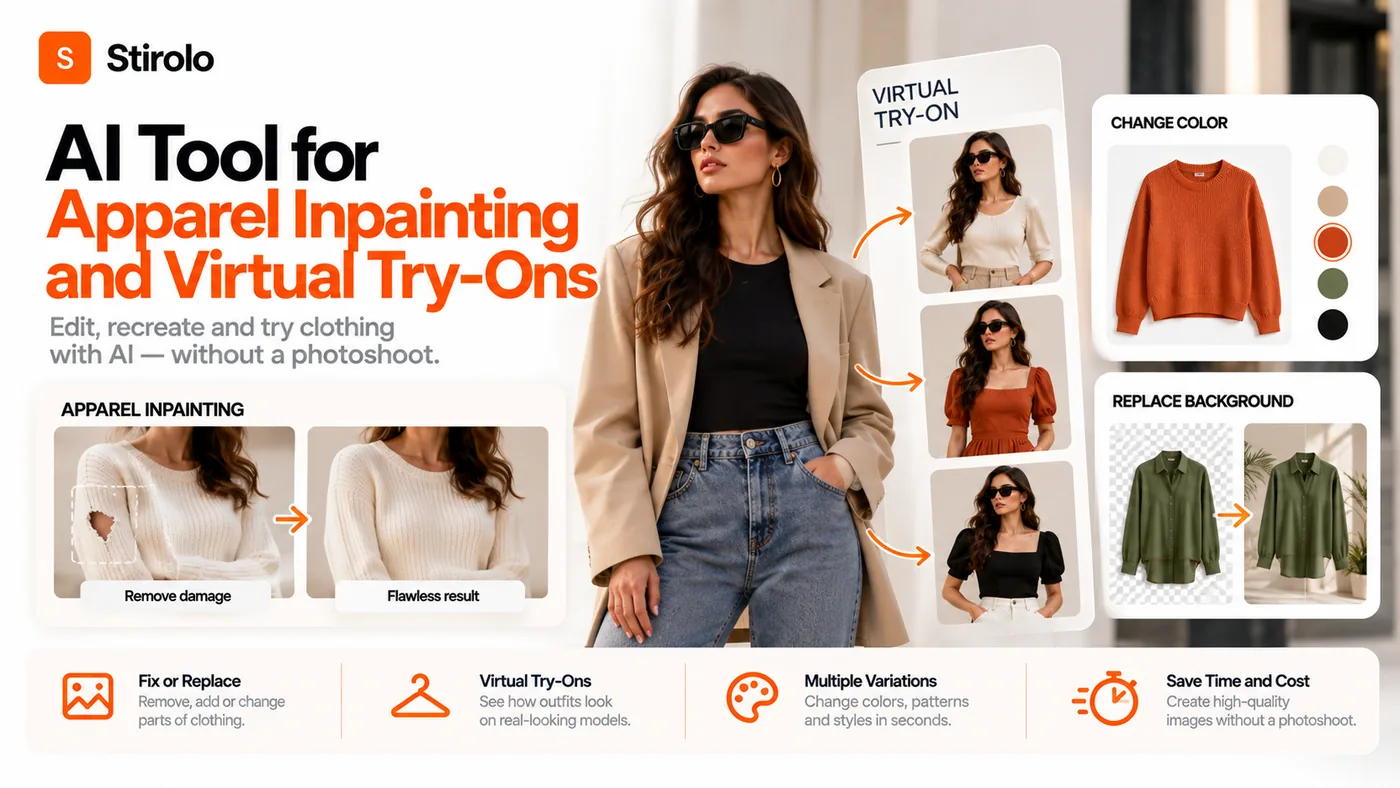
An AI tool for apparel inpainting and virtual try-ons can replace selected clothing regions, transfer a real garment onto a person, or generate a new outfit visualization. The important part is choosing the right workflow: simple inpainting is an image edit, while reliable virtual try-on must preserve both the person and the garment through pose, shape, texture, and occlusions.
For fashion brands, retailers, creators, and styling teams, that difference determines whether an image is useful for experimentation or safe enough to represent a product. A visually impressive result can still be wrong if it changes a print, moves a pocket, shortens a hem, invents a sleeve, or implies a physical fit the system never measured.
What Is an AI Tool for Apparel Inpainting and Virtual Try-Ons?
An AI apparel inpainting tool edits a selected region of an image, usually defined by a mask. You can remove a shirt, replace a jacket, extend a sleeve, repair a missing area, or generate new pixels around clothing while keeping much of the original photo unchanged.
A virtual try-on system has a harder job. It receives information about a person and a garment, then synthesizes an image in which the person appears to wear that garment. Modern image-based systems may use body or pose estimation, human parsing, garment warping, segmentation, diffusion, and inpainting. The goal is not merely to create plausible clothing. It is to keep the identity of the person while preserving recognizable product details.
Research on image-based try-on has repeatedly treated shape distortion and lost pattern detail as central problems. That matters commercially because the garment is not decorative content. It is the item being sold.
How Are Apparel Inpainting and Virtual Try-On Different?
Apparel inpainting answers an editing question: what should appear inside this selected area? Virtual try-on answers a transfer question: how can this specific garment appear on this specific person while both remain recognizable?
Generative fill is broader still. It can invent sleeves, accessories, fabric, or an entire outfit from instructions. That freedom is useful for concepts, but risky when the output is meant to represent a real SKU. Garment transfer sits between editing and try-on: it moves clothing appearance from one source person or product image to another person.
The practical rule is simple. Use inpainting when controlled image editing is the objective. Use garment-aware virtual try-on when the identity of a real product must survive the edit. Use open-ended generative fill when product accuracy is not the primary requirement.
Quick Reference: Choose the Workflow by the Job
| Workflow | Primary input | Best use | Main risk |
|---|---|---|---|
| Inpainting | Person image + mask | Local clothing edits | AI invents product details |
| Garment transfer | Person + garment source | Move a look between people | Shape or texture drift |
| Virtual try-on | Person + product image | Show a real garment on a person | Visualized fit mistaken for measured fit |
| 3D try-on | Body and garment geometry | Geometry-aware simulation | Higher asset and setup cost |
How Does an AI Virtual Try-On Workflow Work?
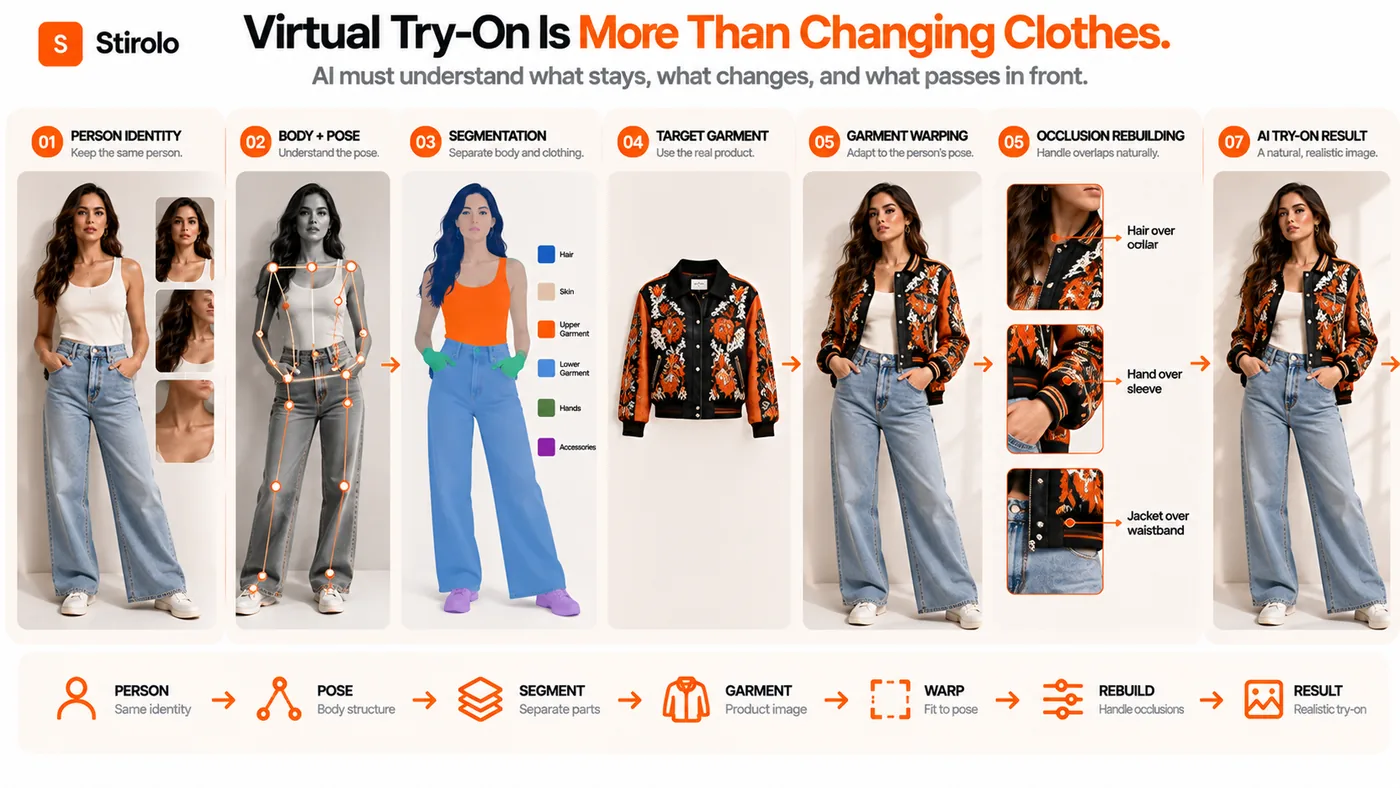
A useful virtual try-on pipeline separates what should stay fixed from what must change. The person identity, face, visible skin, pose, and background may need to remain stable. The target garment must be transferred into the clothing region while respecting the body and anything that passes in front of it.
First, the system identifies the person and relevant body regions. Pose estimation can locate joints and body structure. Human parsing or segmentation can distinguish skin, hair, upper clothing, lower clothing, arms, and other regions. The garment source is also analyzed so its silhouette and visible details can guide the result.
Next, the garment may be geometrically warped toward the target pose. A generative model then reconstructs difficult areas, blends boundaries, and restores missing pixels. Inpainting becomes especially important around sleeves, hands, necklines, hair, and regions hidden in the original photo.
The final image is therefore a synthesis, not a literal photograph of the garment physically draped on that body. That is why visual QA remains necessary even when the result looks photorealistic at first glance.
How to Prepare Images for Apparel Inpainting and Virtual Try-On
To prepare images for apparel inpainting and virtual try-on, start with clean source images that clearly show the person and the garment. Better inputs reduce the amount of information the model has to guess.
Use a garment photo with accurate color, clear edges, visible closures, and enough resolution to inspect small details. Front-facing product images are usually easier than folded garments or heavily styled photos. For complex pieces, extra views can help a human reviewer verify what the generated result should contain, even if the tool accepts only one source image.
For the person image, avoid severe motion blur and extreme occlusion when accuracy matters. A clear front or three-quarter pose makes the clothing region easier to interpret. If hands cover the waist, hair covers the neckline, or a bag crosses the torso, expect the system to reconstruct more pixels.
If the tool exposes a mask, make it deliberate. A mask that is too small can leave fragments of the old garment. A mask that is too large can regenerate skin, hair, jewelry, or background unnecessarily. Preserve regions that do not need to change.
For repeatable creative work, define the desired visual system before generating batches. Stirolo explains a broader wardrobe-aware approach in its AI styling workflow, where clothing decisions are treated as part of a connected styling process rather than isolated images.
What Makes a Virtual Try-On Image Accurate Enough for Ecommerce?
A virtual try-on image is accurate enough for ecommerce only when the visible product details match the item a customer can buy. Photorealism alone is not the standard. Compare the output directly with the source garment at high zoom.
Check color, print scale, logo position, neckline, sleeve length, hem shape, pockets, buttons, zippers, seams, trim, texture, and asymmetrical details. Confirm that the AI has not added a belt, changed a cuff, removed a slit, mirrored a graphic, or converted a loose silhouette into a fitted one.
Then inspect the person. The face should remain stable. Body proportions should not change merely to accommodate the garment. Hands should have plausible relationships with sleeves and pockets. Hair and accessories should appear in front of or behind the garment where physically appropriate.
Finally, classify the image by channel. A creative social post can tolerate more stylization than a primary product image. If a generated image materially changes what the buyer receives, keep it out of the product-detail workflow even if it performs well aesthetically.
Where Do Apparel Inpainting and Virtual Try-On Systems Fail?
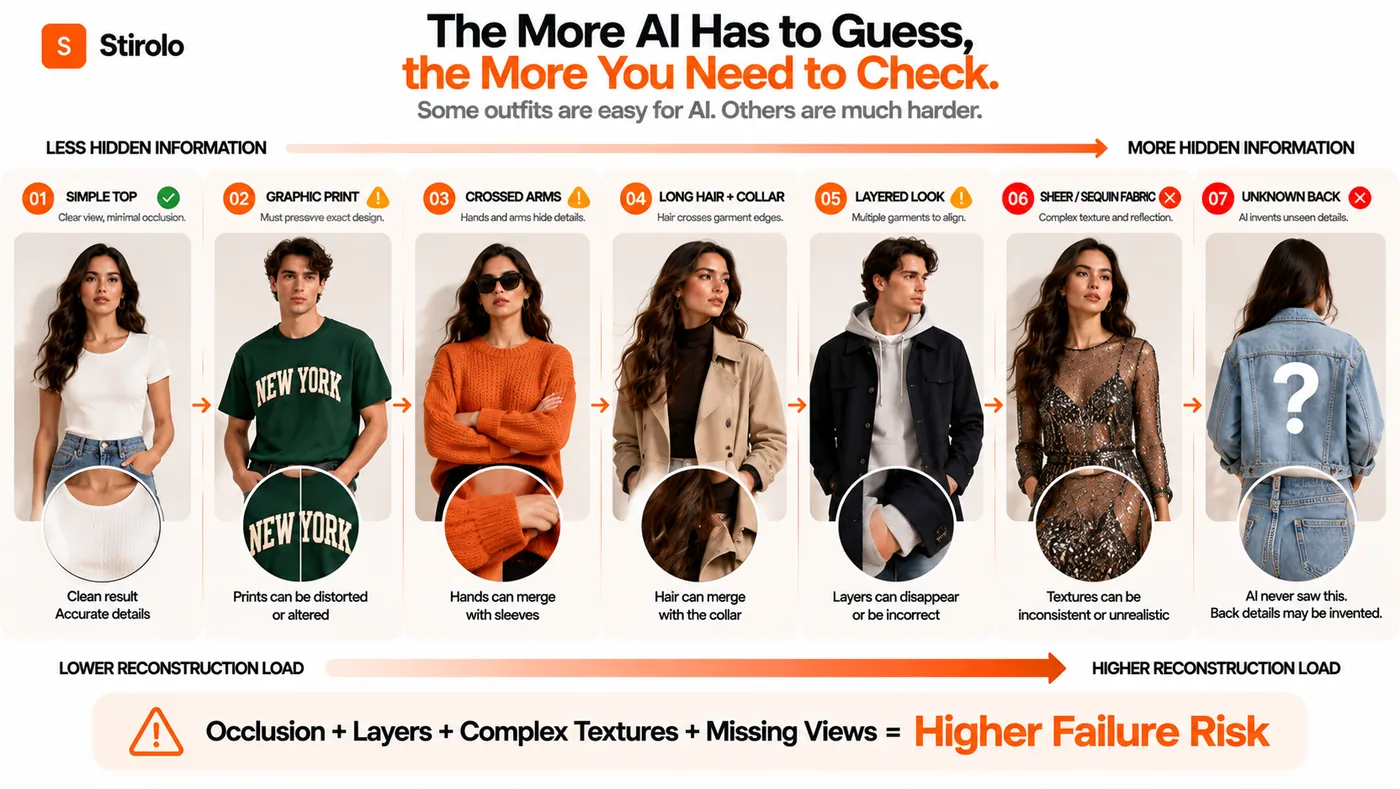
Failure rates rise when the model has to reason about hidden geometry. Arms crossed over the chest can conceal logos and seams. Long hair can cover collars and shoulders. Handbags create overlapping straps. Open jackets reveal multiple layers. Scarves and loose outerwear create ambiguous boundaries.
Complex textiles add another challenge. Small checks, lettering, embroidery, lace, transparency, reflective materials, sequins, and directional prints are easy to distort. A generated fabric can look convincing while no longer matching the real repeat pattern or construction.
Layered outfits are particularly demanding because the system must decide which garment sits above another. A shirt cuff should emerge from a jacket sleeve. A coat should cover the top beneath it without erasing the lower layer. A tucked shirt needs a plausible boundary at the waistband. These relationships are more difficult than swapping a single isolated top.
Side and back views also expose missing information. If the source only shows the front, the AI may invent the back closure, yoke, print continuation, or pocket placement. Treat those invented regions as creative approximations unless the tool has adequate reference information.
How Should You Handle Masks, Hair, Hands, and Other Occlusions?
Occlusions should be treated as a review category, not a cosmetic detail. Inspect every boundary where a body part or accessory crosses the garment. Look for duplicated fingers, sleeves painted over hands, hair fused into fabric, disappearing straps, and broken edges around jewelry.
For manual inpainting, edit the smallest practical region and regenerate difficult areas separately. For virtual try-on, test several representative poses before approving a tool. A system that works on arms-down catalog poses may fail on lifestyle poses with crossed arms or seated bodies.
Can Virtual Try-On Predict Real Clothing Fit?
No, a photorealistic virtual try-on image does not automatically predict physical fit. Image-based generation can visualize appearance, but exact tightness, pressure, stretch, comfort, ease, and mobility require information that may not exist in two photographs.
A model can generate believable folds without knowing the garment pattern, fabric modulus, body measurements, or construction tolerances. It can also make a garment appear longer or more fitted than it is. That is why retailers should avoid presenting a generated visualization as a measurement-backed fit guarantee unless the system actually uses validated sizing or physical data for that purpose.
Virtual try-on can still be valuable for style confidence: color pairing, proportion, silhouette, and an approximate sense of how an outfit may look. Stirolo approaches the adjacent question of what pieces work together through its fashion AI features, which focus on styling and wardrobe decisions rather than claiming a generated image is a physical fitting.
When Should You Use 2D AI Instead of 3D Try-On?
Use 2D image-based AI when speed, accessibility, and photorealistic visualization matter more than physical simulation. It fits workflows built from existing product photos and customer or model images, and it can be practical for ecommerce content, outfit exploration, and rapid creative testing.
Consider 3D when geometry is central to the decision. A 3D workflow can use body models, garment meshes, digital patterns, or material properties, but it also demands more structured assets and production effort. It is not automatically better for every store.
The right choice depends on the promise you make to the user. If the promise is “see this style on a person,” 2D generation may be sufficient after fidelity checks. If the promise is “understand how this garment physically fits and behaves,” the data requirements are much higher.
How to Evaluate an AI Tool for Apparel Inpainting and Virtual Try-Ons
To evaluate an AI tool for apparel inpainting and virtual try-ons, test it with your hardest real products before judging its demo gallery. Use garments that expose the weaknesses you care about: text graphics, fine stripes, asymmetry, sheer fabric, long sleeves, outerwear, layered looks, and distinctive closures.
Run the same garments across several body types and poses. Record how often the output preserves the SKU without manual repair. Measure usable outputs, not total generations. A cheap generation is expensive if your team rejects most results or spends several minutes correcting each one.
Check whether the tool supports masks, reference images, model consistency, batch processing, API access, privacy controls, deletion policies, commercial rights, output resolution, and predictable export formats. If shoppers upload photos, review how those images are stored and deleted before embedding the experience on a store.
Also separate merchant content generation from shopper-facing try-on. A tool that produces excellent on-model catalog images may not offer the latency, privacy design, or interface needed for live customer try-on. The reverse can also be true.
For teams building outfit concepts around a wider wardrobe, Stirolo’s practical style guides can support the styling side of the workflow while image-generation tools handle visualization.
What Should You Measure After Launch?
Track approval rate, correction time, cost per approved image, generation latency, shopper try-on completion, add-to-cart behavior, conversion, and returns by reason. Do not assume that more try-ons mean better outcomes. The useful question is whether the experience improves decisions without creating inaccurate expectations.
Keep a rejection log. Categories such as altered print, wrong silhouette, broken hand, bad occlusion, identity drift, and unrealistic layering make vendor comparisons more objective and reveal which garment types should stay in conventional photography.
Frequently Asked Questions
Is apparel inpainting the same as virtual try-on?
No. Inpainting edits a selected image region. Virtual try-on combines a person and a target garment while trying to preserve both identities and generate a plausible wearing result.
Can AI virtual try-on keep logos and prints exact?
It can preserve them well in some inputs, but exact preservation is not guaranteed. Compare every ecommerce output with the source garment, especially text, repeated patterns, embroidery, and small logos.
Can I use virtual try-on to choose the correct clothing size?
Not by image appearance alone. Size recommendation requires reliable body, garment, sizing, or fit data. A generated image can visualize a look without proving physical fit.
What photos work best for apparel inpainting?
Clear, high-resolution images with visible garment boundaries work best. For controlled edits, use a precise mask and avoid regenerating unrelated skin, hair, accessories, or background.
Should clothing stores replace real photography with AI try-on?
Not automatically. AI can expand model imagery and visualization, but real photography remains useful when exact construction, texture, color, side views, or difficult materials cannot be reproduced reliably.
Use AI Try-On as a Controlled Fashion Workflow
The most useful AI tool for apparel inpainting and virtual try-ons is not the one that creates the most dramatic before-and-after image. It is the one that gives your team enough control to preserve the garment, protect the person image, handle difficult boundaries, and reject outputs that change the product.
Treat inpainting as precise editing, virtual try-on as garment-aware synthesis, and fit prediction as a separate problem with higher data requirements. With that separation, fashion teams can use AI for faster visualization without confusing a convincing image with verified physical fit.