
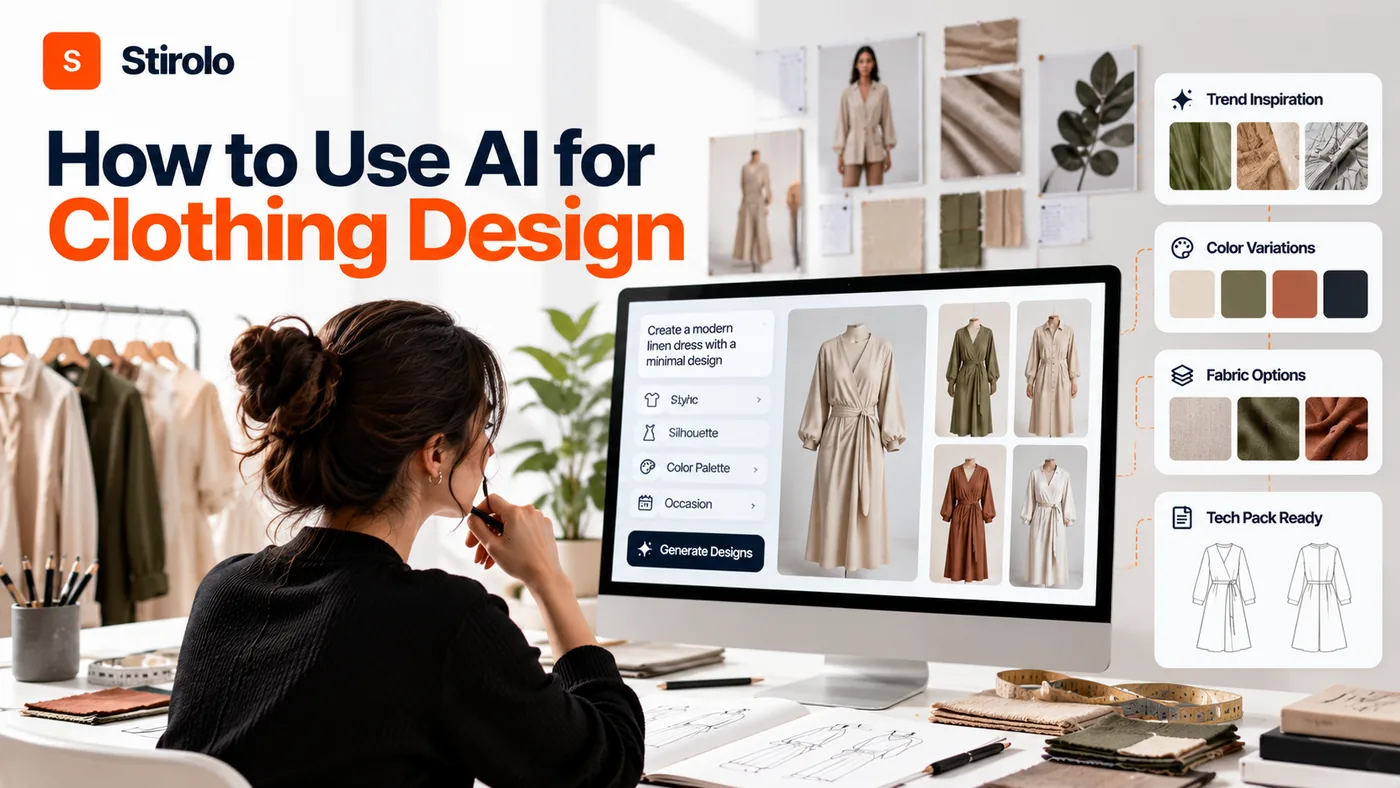
To use AI for clothing design, start with a precise garment brief, generate multiple concepts, refine the strongest direction, then translate the visual into verified construction details before sampling. AI works best as a fast creative and visualization layer, while you keep control of fit, fabric, patternmaking, technical specifications, and final approval.
A good AI workflow does not ask a generator to invent a finished collection from one vague prompt. You give the system constraints, compare options, reject weak ideas, and carry only validated decisions forward. That approach helps independent designers, clothing startups, and established teams explore more directions without confusing attractive images with manufacturable garments.
Current fashion tools can generate garments from text or reference images, create color and texture variations, produce virtual try-on images, and support photorealistic presentation. Production still requires human confirmation of measurements, construction, materials, patterns, grading, and fit. Treat that boundary as the foundation of your workflow.
How Can You Use AI for Clothing Design Without Losing Creative Control?
Use AI to expand and test your choices, not to make every design decision for you. Your creative direction should come before generation. Define the customer, garment category, price position, season, function, silhouette, material direction, and brand codes first.
Keep a short decision log for selected proportions, closures, materials, and details. The log preserves design intent when the visual moves into technical development.
How to Build a Clothing Design Brief AI Can Actually Use
To build a clothing design brief AI can use, describe the garment as a product rather than as an aesthetic mood. Include who wears the item, where they wear it, how the garment should fit, what it must do, and which details cannot change.
A useful brief might specify a cropped women's utility jacket for mild spring weather, relaxed shoulders, waist-length body, four functional pockets, matte hardware, and medium-weight cotton twill. Add a target palette, customer age range, price level, and brand references. Those constraints give the model fewer chances to solve the wrong problem.
Separate fixed requirements from exploratory choices. Keep category, function, target fit, and manufacturing limits fixed. Let AI explore pocket geometry, seam placement, color combinations, trims, or styling. This split keeps experimentation productive.
- Product: garment category, customer, use case, season, target price, and size range.
- Fit: fitted, regular, relaxed, oversized, cropped, longline, high-rise, or another defined proportion.
- Material: fabric family, approximate weight, stretch, drape, finish, and care constraints.
- Construction: closures, pockets, seams, lining, hem, collar, cuffs, hardware, and required functions.
- Visual direction: palette, print language, brand references, styling context, and details to avoid.
How to Use AI for Fashion Research and Moodboards
To use AI for fashion research, ask the system to organize evidence and expose patterns, then verify important trend claims with reliable sources. AI can cluster references by silhouette, color, fabric, detail, or customer mood, which makes a large inspiration folder easier to interpret.
Trend forecasting platforms also use data analysis to track changes in colors, fabrics, silhouettes, patterns, and styles. That information can support a collection brief, but a trend signal should not automatically become a design. Your customer, brand position, climate, lead time, and price architecture still determine whether a trend belongs in the range.
For foundational wardrobe concepts such as fit, color, capsules, and seasonal dressing, the Stirolo style guides provide useful consumer-facing context. That perspective can help you judge whether a concept will integrate into real wardrobes rather than only look strong on a moodboard.
How to Generate Clothing Concepts With AI
To generate clothing concepts with AI, begin with one defined garment and request controlled variations around a small number of variables. Do not change silhouette, fabric, color, trim, styling, and setting at the same time.
Start with a base direction. Generate four to eight options. Select one or two that meet the brief. Then change a single design variable, such as sleeve volume or pocket placement. Controlled iteration lets you understand which change improved the garment. Random prompting produces attractive noise but weak design reasoning.
Text-to-image tools can visualize a written idea, while image-to-image tools can develop a sketch or reference. Save prompts and references so useful directions can be reproduced later.
How to Write Better Clothing Design Prompts
To write better clothing design prompts, describe category, silhouette, material, construction, color, view, and presentation in that order. Specific garment language usually gives you more controllable results than broad aesthetic labels.
For example, request a men's hip-length field jacket with a relaxed straight fit, waxed cotton shell, concealed front zip, four patch pockets, corduroy collar, dark olive color, front three-quarter view, neutral studio background. Then add exclusions such as no logos, no extra pockets, no glossy fabric, and no decorative straps.
Avoid treating the generated material appearance as proof of fabric behavior. An image model can depict silk, denim, leather, knit, or technical fabric convincingly while still inventing impossible drape, thickness, seams, or edge finishes. Use material words to guide visualization, then validate the real textile separately.
How to Create Useful Variations Instead of Random Images
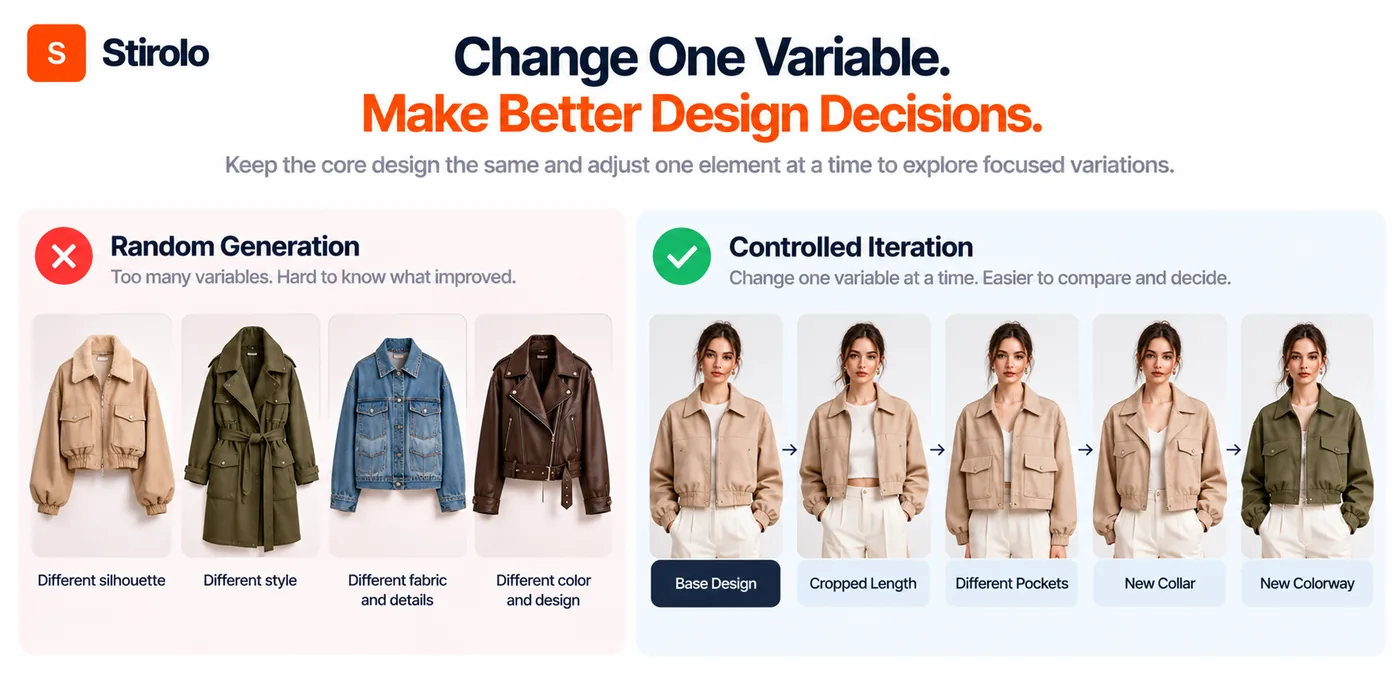
To create useful variations, lock the core garment and change one design decision per generation round. A variation set should answer a question.
Ask whether the jacket works better cropped or hip-length. Compare a two-pocket front against four pockets. Test three muted colors on the same silhouette. Compare a point collar with a stand collar. These sets support decisions because the outputs differ for a known reason.
How to Use AI for Colorways, Prints, Fabrics, and Details
To use AI for colorways and surface design, keep garment geometry stable while changing palette, print, texture, trim, or finish. This stage helps you compare visual directions before commissioning physical strike-offs or samples.
Reference-image controls can guide generated patterns, color combinations, and visual styles. Some fashion software also includes AI texture or graphic generation. Use those outputs as design candidates rather than final production files. A textile print still needs a clean repeat, correct scale, controlled colors, and the right file preparation for the chosen printing method.
Fabric choice needs physical reasoning. A voluminous sleeve that works in crisp poplin may collapse in a soft jersey. A narrow skirt rendered in rigid denim may need different ease than the image suggests. Check weight, stretch, recovery, opacity, shrinkage, drape, abrasion, care, and supplier availability before approving a material direction.
How to Turn an AI Clothing Image Into a Real Design
To turn an AI clothing image into a real design, redraw the garment as an explicit set of construction decisions. The render is a reference. The real design begins when every visible feature has a defined material, dimension, seam, attachment, and function.
Create front and back views. Add side or detail views when construction needs clarification. Decide where seams start and end. Define pocket type and opening. Specify closures, topstitching, edge finishes, lining, interfacing, trims, labels, and hardware. Remove any AI-generated detail that cannot be explained or manufactured consistently.
Resolve contradictions such as unusable pockets, changing seams, or impossible collar attachments before a pattern maker receives the design.
How to Check Construction and Material Feasibility
To check feasibility, review the concept against fabric behavior, pattern geometry, sewing sequence, tolerances, and the factory capabilities available to you. Ask a technical designer, pattern maker, or experienced sample maker to challenge the visual before development.
Review load points and functional areas. Pockets, closures, stretch seams, embellishment, and wash treatments can all change construction requirements.
AI can help you create a checklist or organize review notes, but AI cannot physically handle the fabric or inspect a sewn sample. Material swatches and real prototypes remain essential when hand feel, recovery, movement, comfort, or durability affects the product.
How to Build a Technical Handoff
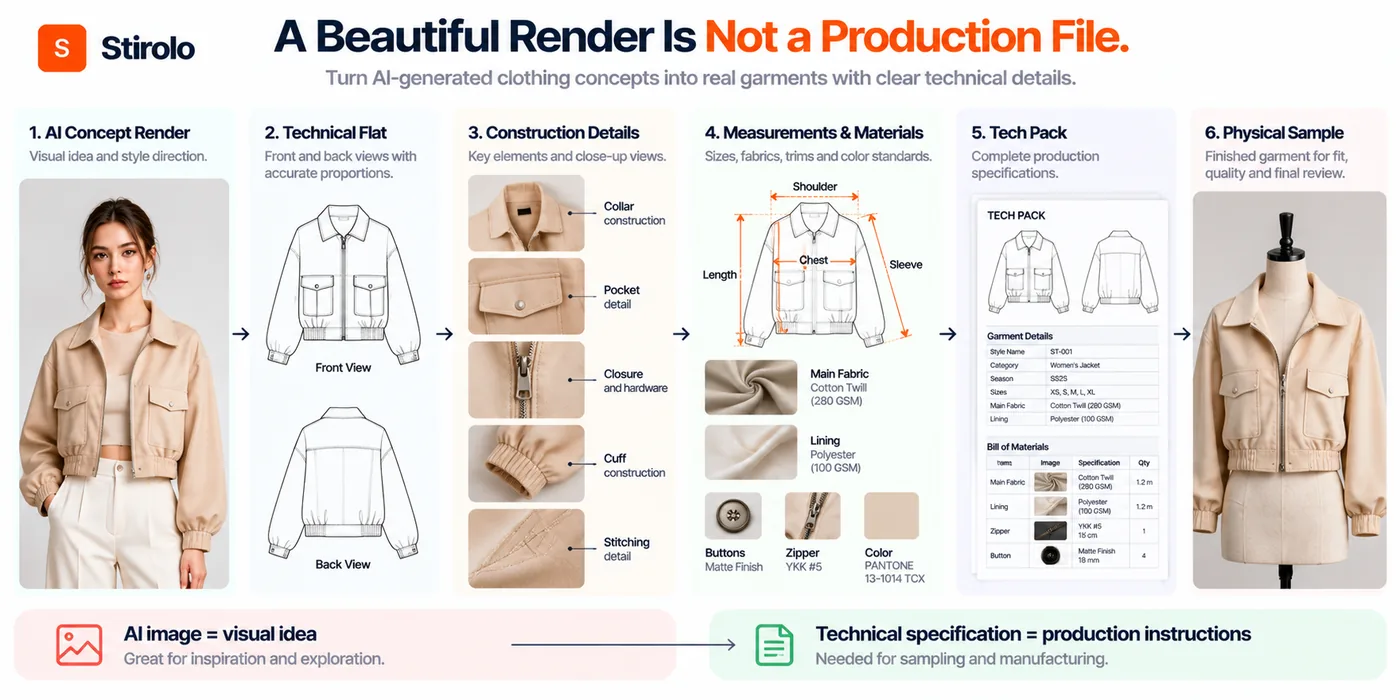
To build a technical handoff, convert the approved concept into flats, measurements, construction notes, material specifications, trim details, color standards, and labeling requirements. A factory should not have to infer production details from a photorealistic AI image.
A tech pack can include a bill of materials, points of measure, graded size information, stitch and seam instructions, artwork placement, print dimensions, hardware codes, packaging notes, and revision history. AI can help draft descriptions or organize repetitive fields, but a qualified team member should verify every production-critical value.
How to Use AI for 3D Garment Visualization and Virtual Try-On
To use AI for 3D garment visualization, combine accurate garment geometry with digital avatars or try-on imagery to evaluate appearance before committing to more physical samples. Use visualization to ask better questions, not to declare fit solved.
Modern clothing software can generate or edit garment images, create flat lays, and produce virtual try-on results from garment and model images. 3D garment systems can also simulate pattern pieces on avatars. These workflows help teams review proportion, styling, color, and presentation earlier.
Virtual try-on remains a visual approximation. A convincing image does not measure pressure, comfort, mobility, fabric recovery, seam irritation, or how a garment changes after laundering. Physical fit sessions remain important for products where those properties matter.
Consumer styling tools offer another perspective on visualization. Stirolo styling features combine body analysis, wardrobe context, outfit recommendations, and on-body visualization. For designers, that kind of downstream context highlights a useful question: does the new garment work with clothes customers already own?
How to Validate AI Designs Through Samples and Fit Testing
To validate an AI-assisted design, test the physical sample against the original product brief rather than against the beauty of the render. The sample must prove fit, movement, construction, material behavior, finish, and repeatability.
Run the first sample on the intended base size. Measure every critical point. Check balance from front, side, and back. Test sitting, reaching, walking, fastening, pocket access, and any activity the product promises to support. Photograph problems and attach each correction to a measurable instruction.
A second sample should verify corrections. Once the base fit works, review grading across the planned size range with real measurement logic and suitable fit models or forms.
Which Parts of Clothing Design Should You Not Hand Over to AI?
Do not hand final responsibility for fit, safety, construction, sizing, material performance, intellectual property, or factory approval to AI. Those decisions carry physical, commercial, or legal consequences that require accountable human review.
AI output can contain inconsistent geometry, invented details, incorrect text, unstable logos, unrealistic fabric behavior, and design elements that resemble existing work. A generated image may also change important features between front and back views. Treat every output as unverified until a designer checks it.
Protect confidential work as well. Review the terms of any service before uploading unreleased collections, proprietary patterns, customer data, model photographs, or brand archives. Commercial-use rights, training policies, retention rules, and partner-model terms can differ between tools.
How to Keep AI Clothing Designs Original and On-Brand
Keep AI clothing designs original by feeding the workflow your own design rules, references, constraints, and decisions instead of chasing generic aesthetic prompts. A recognizable brand comes from repeated choices, not from one image style.
Create a small internal design vocabulary. Define preferred proportions, recurring seam language, hardware finishes, color families, print scale, logo rules, fabric categories, and details the brand avoids. Use the vocabulary in briefs and reviews. The system then explores inside a creative territory you defined.
Do not ask AI to copy a living designer or a competitor collection. Use broader design attributes and your own references. Keep records of original sketches, briefs, revisions, and approvals. Those records help show how human creative decisions shaped the final product.
Compare new concepts with your existing range. Repeated materials, colors, proportions, or details help individual garments form one coherent collection.
How Can Customer Styling Data Improve Future Clothing Design?
Customer styling data can improve future clothing design by showing which garments combine easily, which silhouettes get repeated, and which purchases struggle to earn a place in real wardrobes. That feedback can complement sales data with evidence about use.
A sell-through report tells you that a garment sold. Wardrobe behavior can reveal whether customers repeatedly wear the garment, pair it with several categories, or leave it unused. Those signals can inform future color choices, versatility, assortment gaps, and product descriptions.
Stirolo demonstrates the consumer side of that loop through wardrobe tracking, fit-aware recommendations, wear history, and preference learning in its Stirolo AI styling process. A clothing brand does not need to copy that system to learn from the principle: design quality includes how well a garment lives after purchase.
Use aggregated, permissioned customer data. Collect only the information needed for the product decision.
A Practical AI Clothing Design Workflow
A practical AI clothing design workflow moves from constrained exploration to increasingly verified decisions. Each stage should reduce uncertainty before the next stage becomes more expensive.
| Task | AI Method | Timing | Difficulty |
|---|---|---|---|
| Define brief | Structure customer, fit, material, function, and brand constraints | 30-60 min | Easy |
| Research direction | Cluster references and compare trend or customer signals | 1-3 hours | Medium |
| Generate concepts | Create controlled silhouette and detail variations | 1-2 hours | Easy |
| Refine surfaces | Test colorways, prints, textures, and trims | 1-3 hours | Medium |
| Technical review | Convert visuals into explicit construction decisions | 2-6 hours | Hard |
| 3D or try-on | Review proportion, styling, and presentation digitally | 1-4 hours | Medium |
| Sample and fit | Measure, wear-test, correct, and resample physically | Days-weeks | Hard |
| Final approval | Verify specifications, grading, materials, and production files | 1-3 days | Hard |
Use AI heavily while changes are cheap, then increase human and physical verification as the design approaches production.
FAQs About Using AI for Clothing Design
Can AI design clothes from a text prompt?
Yes. AI image tools can turn a written garment description into visual concepts and variations. You still need technical development before the concept becomes a manufacturable garment.
Can AI create a production-ready tech pack?
AI can assist, but human verification is still required. AI can draft descriptions and organize specifications, while a technical designer should confirm measurements, construction, materials, grading, and factory instructions.
Can AI replace a fashion designer?
No. AI can accelerate research, visualization, iteration, and repetitive documentation. Designers still make accountable decisions about customer needs, originality, proportion, construction, fit, materials, and collection coherence.
Can AI help with clothing fit?
Yes, within limits. Virtual try-on and 3D simulation can help you review proportion and identify questions earlier. Physical samples and fit testing remain necessary for comfort, movement, pressure, recovery, and production approval.
What is the best way to start using AI for fashion design?
Start with one garment and one narrow task. Use AI to generate controlled concept variations or colorways, document what improved, and keep the existing technical development process in place until the new workflow proves reliable.
Design Faster Without Letting the Tool Design for You
AI gives clothing designers a faster way to see possibilities, compare directions, and communicate ideas. The value comes from disciplined iteration, not unlimited generation. Start with a real product brief, change variables deliberately, and reject outputs that ignore material or construction reality.
As production approaches, replace visual assumptions with measured decisions. Verify fabric, pattern, fit, construction, grading, and factory instructions.
If you also want to understand how AI evaluates clothing after it enters a real wardrobe, explore Stirolo styling features and see how fit, wardrobe context, wear behavior, and personal taste can shape clothing decisions beyond the design studio.