

Text to image AI for fashion lookbooks and catalogs can speed up concepting, art direction, scene creation, and image production. For product-accurate catalog work, however, text prompts alone are rarely enough because the model can invent or alter garment details.
The reliable approach is to separate creative generation from product truth. Use prompts to define mood, model, setting, lighting, lens feel, and composition. Use garment reference images or product-preserving workflows to control the clothing itself. Then inspect every output against the real SKU before it reaches a product page, marketplace feed, wholesale catalog, or paid campaign.
That distinction matters because a lookbook and a catalog solve different problems. A lookbook communicates a collection story. A catalog helps a buyer understand a specific product. The first can allow more visual interpretation. The second needs stricter accuracy, repeatability, and variant control.
What Is Text to Image AI for Fashion Lookbooks and Catalogs?
Text-to-image AI creates new visuals from written instructions, while fashion production often adds reference images to control the actual garment. A prompt might describe a full-length studio portrait, soft daylight, a neutral set, and an editorial pose. A reference image can tell the system which dress, jacket, print, or accessory must remain recognizable.
For fashion teams, this creates several possible workflows. Pure text generation is useful for mood boards, campaign concepts, fictional styling ideas, and backgrounds. Image-conditioned generation is more suitable when a real product must appear. AI fashion-model tools specialize further by placing a supplied garment on a generated person. Product-photography tools may focus on background replacement, cleanup, shadow creation, cropping, or batch standardization.
The right workflow therefore depends on what the image is claiming. If it represents a purchasable SKU, visual creativity cannot override product accuracy. If it is editorial inspiration with no specific item for sale, the team has more freedom to generate from text.
Why Is Pure Text Prompting Risky for Real Fashion Products?
Pure text prompting is risky because generative models optimize for a plausible image, not an exact reconstruction of your SKU. A prompt can describe a black cropped jacket with silver hardware, but it cannot reliably encode every seam, zipper, pocket, cuff, lining, logo, and proportion that makes one real jacket different from another.
The problem becomes more visible with graphic tees, patterned fabrics, embroidery, unusual necklines, asymmetric cuts, branded hardware, lace, sheer materials, and garments with important back details. An output can look polished while quietly moving a print, changing a button count, shortening a hem, adding a pocket, or simplifying a texture. Those changes are creative errors when the image is used to sell the original item.
This is why the source garment should become the anchor for commerce imagery. Text can control the world around it. The product reference should control the product. A team that treats prompts as the only source of truth may produce beautiful images that cannot safely function as catalog photography.
How to Use Text to Image AI for Fashion Lookbooks and Catalogs
To use text to image AI for fashion lookbooks and catalogs, define a fixed visual system, supply accurate garment references, generate a small approval set, and scale only after product QA. The workflow should make consistency easier with every new SKU rather than forcing the team to reinvent prompts each time.
1. Build the Visual System Before Generating
Start with decisions a photographer and art director would normally lock before a shoot. Define the image ratio, crop, camera height, background family, lighting direction, contrast, model framing, pose range, styling rules, and allowed props. A wholesale line sheet may need restrained front-facing images. A seasonal lookbook may use wider compositions, movement, and location-based scenes.
Write these decisions as a short production specification. The specification matters more than a long poetic prompt because it gives the team repeatable constraints. It also gives reviewers a clear standard for rejecting an image that is attractive but off-brand.
2. Prepare Garment Reference Images
Use the cleanest product source available. Front and back views are useful when the tool accepts multiple references. Include close detail images for prints, logos, closures, embroidery, texture, or construction features that must not change. Keep color correction stable before generation so the AI is not working from inconsistent source files.
A flat lay can work for some workflows, while ghost-mannequin or existing on-model photography may provide better structural information for complex garments. Test the same difficult SKU across input types before standardizing the process.
3. Write Controlled Prompts
Prompt the variables you actually want to change. State the scene, model characteristics, pose, lighting, camera framing, mood, and styling context. Avoid asking the model to reinterpret the garment when the garment must remain exact. If the system supports negative instructions or locked references, use them to reduce unwanted accessories, text, logos, extra layers, or design changes.
Create a prompt template with variable fields instead of writing from scratch. For example, keep the studio, lens feel, crop, lighting, and model family fixed while changing only SKU, pose, or background. This makes output differences easier to diagnose.
4. Generate a Small Approval Set
Do not start with the whole catalog. Select five to ten products that expose likely failure modes: a solid basic, a dense print, a logo item, a sheer fabric, a structured jacket, a long dress, and a garment with visible hardware. Generate enough variations to learn where the system is stable and where it drifts.
Review those images at full resolution. If the difficult products cannot pass, adding hundreds of easier SKUs will only hide the weakness until publication.
5. Scale Only After Garment QA
Once a test set passes, save approved prompts, reference preparation rules, export dimensions, naming conventions, and review criteria. Batch production should still include human approval for product-facing images. Automation is most valuable when it removes repetitive setup, not when it removes responsibility for checking what customers will see.
How Should Lookbook Images Differ From Catalog Images?
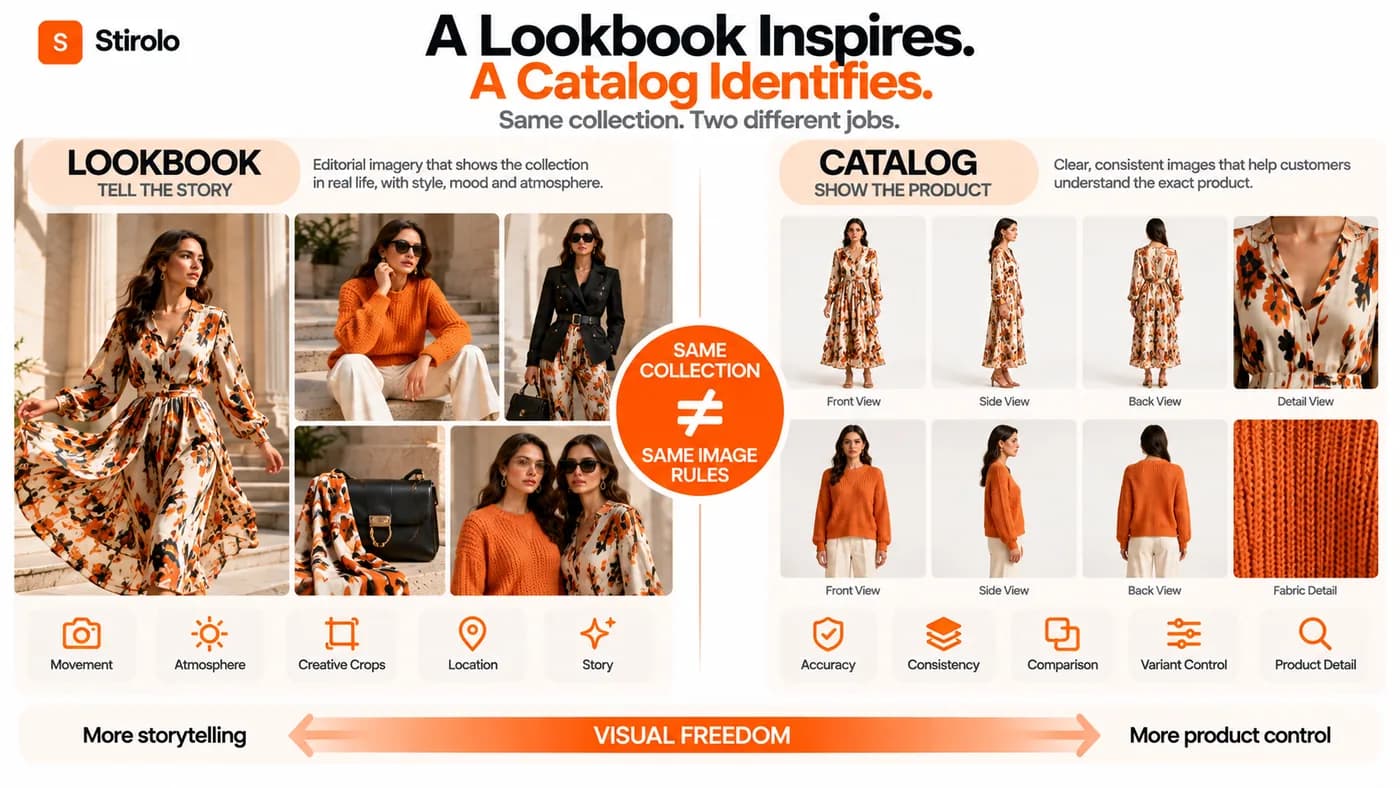
Lookbook images can prioritize story and atmosphere, while catalog images should prioritize product identification and consistency. A lookbook may show movement, layered styling, dramatic crops, environmental context, and varied camera angles. The sequence matters because the images work together to express the collection.
Catalog images need a stricter visual grammar. Buyers should be able to compare products quickly. Front views, back views, detail views, predictable crops, stable scale, and consistent backgrounds reduce ambiguity. A wholesale catalog may also need colorways and product codes to line up cleanly with the visuals.
For ecommerce feeds, channel rules add another constraint. Google Merchant Center says main product images should accurately display the product, show the correct variant, and avoid generic or placeholder imagery. It also requires generative-AI image metadata to be preserved. That makes catalog governance a publishing requirement, not just an aesthetic preference.
How Do You Keep Garments Accurate in AI Fashion Images?
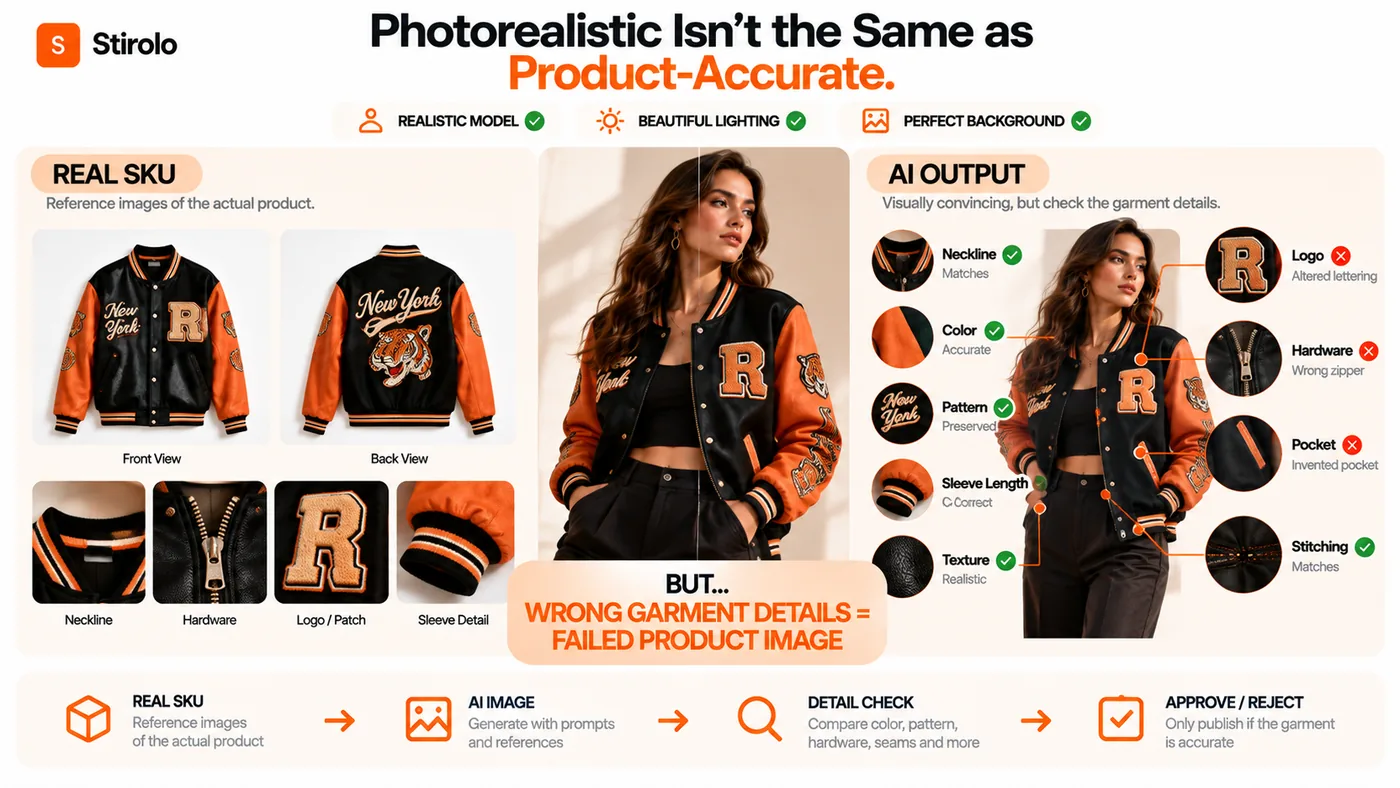
Keep garments accurate by comparing every generated image against a SKU-specific checklist rather than judging realism alone. A realistic face, hand, or background does not prove the clothing is correct. The reviewer should ignore overall polish for a moment and inspect the item as merchandise.
Check color and pattern first because shoppers notice them quickly. Then compare neckline, sleeve length, hem, silhouette, closures, pockets, seams, trims, logos, graphics, hardware, texture, and visible construction. For a matching set, confirm that both pieces are the correct products and that the AI has not merged details between them.
Keep a real reference image beside the generated output during approval. Mark failures by type so the team can learn which categories need a different input or workflow. A tool that performs well on plain knitwear may still fail on typography, checks, sequins, or complex outerwear.
How Do You Keep a Fashion Collection Visually Consistent?
Consistency comes from locking variables that should not change and documenting the variables that may change. The model identity, camera distance, crop, light direction, background palette, shadow softness, retouching level, and export ratio can all be standardized. Poses and locations can vary within an approved range.
Create a small set of reference frames for each image family: clean catalog, on-model ecommerce, editorial lookbook, social crop, and campaign hero. New generations should be compared with those frames before approval. This is more reliable than asking whether each image looks good by itself.
Consistency also matters downstream. Stirolo uses AI around wardrobe and styling context rather than only image creation; its AI styling features show why fashion AI can extend beyond a single generated asset into organized clothing and outfit experiences. The production lesson is similar: structured inputs create more dependable outputs than isolated one-off prompts.
Which AI Workflow Fits Each Fashion Image Job?
Choose the workflow by the amount of product truth the image must preserve. The table below separates creative freedom from catalog responsibility.
| Image job | Best starting point | Product accuracy need | Main QA focus |
|---|---|---|---|
| Mood board or concept | Text prompt | Low if no real SKU is shown | Brand direction and originality |
| Editorial lookbook | Prompt + garment reference | Medium to high | Garment identity and visual continuity |
| Ecommerce catalog | Product reference workflow | Very high | Variant, construction, color, pattern |
| On-model product image | Garment + model workflow | Very high | Fit appearance and garment details |
| Lifestyle campaign | Product reference + scene prompt | High | Product truth plus scene realism |
| Background variation | Existing product image | Very high | Edges, shadows, color, untouched product |
A general image generator may be excellent for concept development but weak at product preservation. A fashion-specific platform may accept garment references, model controls, and repeatable catalog settings. Product-photography systems may add batch editing and visual QA. Current platforms such as Photoroom and Flair market combinations of product staging, fashion models, templates, or product-preserving workflows, but their claims should be tested on your own difficult SKUs before adoption.
Where Can AI Fashion Images Be Published?
AI fashion images can serve lookbooks, social media, ads, email, wholesale materials, and ecommerce, but the approval standard should change by channel. An inspirational social post can tolerate more scene invention than a main product image. A PDP image should be treated as a representation of what the shopper can buy.
For marketplaces and Shopping feeds, check each platform’s current image and synthetic-media rules before export. Google currently permits AI-generated images in product image attributes but requires AI-generation metadata to remain embedded. Its product-image guidance also stresses accurate product and variant representation.
For your own store, create an internal rule even when a platform does not force one. Decide which image slots can use synthetic lifestyle scenes, which require verified product accuracy, and when disclosure is appropriate. Keep original source photography and approved generated assets traceable to the SKU.
What Should Fashion Teams Check Before Choosing a Tool?
Test tools on garment fidelity, consistency, controllability, throughput, rights, and review workflow before comparing headline image quality. A beautiful demo is not evidence that the platform can handle your collection.
Build a fixed evaluation pack of hard products and run the same jobs through each candidate. Measure how many outputs pass without repair, how long approval takes, whether model identity stays stable, whether batch settings repeat correctly, and whether the platform preserves the files and metadata you need for publishing. Calculate cost per approved image rather than cost per generation.
Review commercial terms as well. Confirm permitted business use, treatment of uploaded product assets, retention settings, model or likeness controls, and any restrictions that matter to your markets. If the workflow will connect to a product information management system, digital asset management system, or store backend, test the API and naming behavior before committing to scale.
What Can Go Wrong With AI Fashion Lookbooks and Catalogs?
The most common failure is a visually convincing image that is commercially inaccurate. Teams can also lose consistency across a collection, create impossible garment behavior, introduce unwanted text or accessories, or publish a variant that does not match the SKU.
Human anatomy can still fail in hands, limbs, hair interactions, and layered clothing. Repeated generations may change the model’s face or body. Background objects can bend, repeat, or conflict with perspective. Aggressive retouching can remove fabric texture that buyers need to see. These errors are easier to catch when the team reviews at full resolution instead of approving from thumbnails.
A second failure is using one tool for every job. Fashion image production is a pipeline. Concept generation, garment-preserving model imagery, background creation, cleanup, cropping, and batch export may need different capabilities. Stirolo’s explanation of how AI styling works provides another example of task-specific fashion AI: recommendation and wardrobe context are different problems from synthetic photography.
FAQs About Text to Image AI for Fashion Lookbooks and Catalogs
Can text-to-image AI create a complete fashion catalog?
Yes, but text alone should not be the only control when the catalog represents real products. Use garment references, fixed production rules, and SKU-level QA for commerce images.
Is text-to-image AI better for lookbooks than product pages?
It usually offers more freedom for lookbooks because lookbooks prioritize art direction and story. Product pages demand tighter garment and variant accuracy.
Can AI keep the same model across a whole collection?
Some workflows can maintain a consistent model more reliably than general prompting, but you should test identity stability before scaling. Lock model references or platform-specific identity controls where available.
Do AI catalog images need to match the real garment exactly?
Yes, when the image is being used to represent a product for sale. Color, pattern, construction, silhouette, and variant details should match what the customer will receive.
Should fashion brands replace all photography with AI?
No. A hybrid workflow is often safer for complex garments, hero campaigns, texture-critical products, fit-sensitive items, and any SKU that repeatedly fails AI fidelity checks.
Build a Repeatable Fashion Image System
The value of text to image AI for fashion lookbooks and catalogs comes from a controlled production system, not from generating the largest number of pictures. Use text to establish art direction, references to preserve the garment, templates to hold visual consistency, and human QA to protect product truth.
That workflow gives creative teams room to experiment without turning the catalog into fiction. It also makes it easier to reuse approved visual rules across new drops, channels, and campaign formats. For the consumer side of fashion technology, Stirolo’s practical style guidance shows how structured fashion information can support useful decisions after imagery has done its job of presenting the clothes clearly.